How to install PySide2 in Blender Python
GOAL
To use PySide/PySide2 UI in Blender Addon.
In this article PySide2 UI is used independently. PySide is not embedded in Blender custom UI or include Blender custom UI inside.
(more…)To use PySide/PySide2 UI in Blender Addon.
In this article PySide2 UI is used independently. PySide is not embedded in Blender custom UI or include Blender custom UI inside.
(more…)When I install PySide2 with pip command, the error below occurred. There are 2 exceptions “socket.timeout: The read operation timed out” and “pip._vendor.urllib3.exceptions.ReadTimeoutError“.
<!–more–>
>pip install pyside2
Collecting pyside2
  Downloading PySide2-5.15.2-5.15.2-cp35.cp36.cp37.cp38.cp39-none-win_amd64.whl (136.3 MB)
     |██████████████████              | 75.3 MB 25 kB/s eta 0:40:29ERROR: Exception:
Traceback (most recent call last):
  File "c:\users\<user_name>\appdata\local\programs\python\python38\lib\site-packages\pip\_vendor\urllib3\response.py", line 437, in _error_catcher
    yield
.
.
. Omitted
.
.
  File "c:\users\<user_name>\appdata\local\programs\python\python38\lib\ssl.py", line 1099, in read
    return self._sslobj.read(len, buffer)
socket.timeout: The read operation timed out

During handling of the above exception, another exception occurred:

Traceback (most recent call last):
  File "c:\users\<user_name>\appdata\local\programs\python\python38\lib\site-packages\pip\_internal\cli\base_command.py", line 228, in _main
    status = self.run(options, args)
.
.
. Omitted
.
.
  File "c:\users\<user_name>\appdata\local\programs\python\python38\lib\site-packages\pip\_vendor\urllib3\response.py", line 442, in _error_catcher
    raise ReadTimeoutError(self._pool, None, "Read timed out.")
pip._vendor.urllib3.exceptions.ReadTimeoutError: HTTPSConnectionPool(host='files.pythonhosted.org', port=443): Read timed out.Windows 10
Pyhon 3.8.7
pip 20.2.3
When response couldn’t gotten in time, both of exceptions are occurred. The time is defined by environment variable “PIP_DEFAULT_TIMEOUT”.
The cause is just a poor connection in my case.
Change the value of PIP_DEFAULT_TIMEOUT (the value is an integer in seconds).
Reference : “Environment Variables” from pip documentation
pip --default-timeout=1200 install pyside2
set PIP_DEFAULT_TIMEOUT=1200
When I activate my addon that uses operations with bpy.ops in register() function, the error “AttributeError: ‘_RestrictContext’ object has no attribute ‘view_layer’ ” occurred.
(more…)I mistakenly overwrote my article in WordPress. How can I recover them?
To see revisions of the article and recover previous version in WordPress.
WordPress 5.6
Windows 10
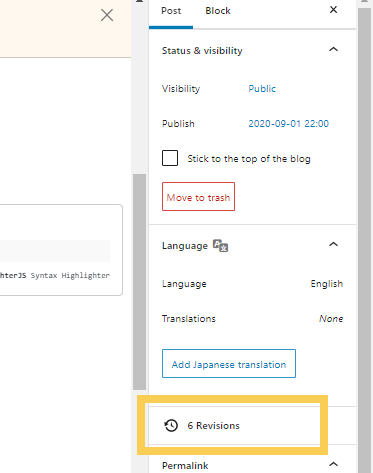
Open the post and click “Revisions” in right sidebar.
Select the revision you’d like to recover and click “Restore This Revision” button.
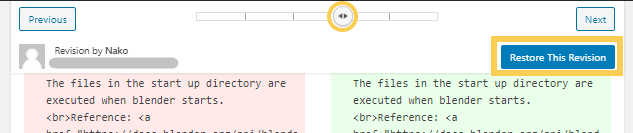
“Restore This Revision” button couldn’t be pressed for some reasons.

You can copy the elements of previous version and paste it into the editor.
To run Python script when Blender starts only once or every time.
Blender 2.83
Windows 10
I created a simple Python script “Documents\blenderPython\test\spheres.py” to add spheres as below
import bpy
for i in range(3):
bpy.ops.mesh.primitive_uv_sphere_add(radius=1, location=((i-1)*3, 0, 3))Start blender in command prompt with an argument -P or –python.
Reference: Python Options in Blender 2.91 Manual